4 Open-Source GitHub Repos for Your Money (Budget, Stocks, Portfolio)
I screened 9 GitHub repos that promise to replace paid finance apps and kept 4: Firefly III for budgeting, Ghostfolio for portfolio tracking, yfinance for stock data, and OpenBB for research. Star counts and last-commit dates verified on July 13, 2026, plus what each one actually does, how to start, and the catches (hosting, API keys).
Add up a budgeting app, a portfolio tracker, and a market data subscription and you are easily paying 40 a month for things open-source software does for free. GitHub is full of finance tools developers built for themselves; the hard part is telling the maintained ones from the abandoned ones, because from the outside they look identical. So I screened 9 candidates and kept 4.
Two terms first, in plain English. GitHub is the site where developers publish and build code together. Open source means that code is public and free for anyone to use, so you are looking at a free program whose entire construction is out in the open.
One thing up front: I do not clone and run random repos on my machine. Open source is not automatically safe, so every install path below was verified against the official docs, and the screens were checked through public demos. The commands are quoted from each project's own documentation.
My filter: survival signals, not star counts
Three checks, straight off each repo page: stars (rough popularity), latest commit or release (updated within 12 months, meaning alive), and docs a normal person can follow. Every number below was read directly from the repo pages on July 13, 2026.
| Repo | Job | Stars | Last update | License |
|---|---|---|---|---|
| Firefly III | Budgeting | 24k | v6.6.6 (Jul 1, 2026) | AGPL-3.0 |
| Ghostfolio | Portfolio tracker | 8.9k | v3.25.0 (Jul 12, 2026) | AGPL-3.0 |
| yfinance | Stock data | 24.7k | v1.5.1 (Jun 28, 2026) | Apache-2.0 |
| OpenBB | Investment research | 70.5k | Apr 2026 release | AGPL-3.0 |
1. Firefly III: the budget app that survives its own company
 The Firefly III repo. github.com/firefly-iii/firefly-iii
Subscribe to a budgeting app long enough and a strange thought creeps in: this is my spending history, so why am I paying monthly to keep it on someone else's server? When the service dies, years of records die with it. Mint users lived that in 2024, and even in open source, Maybe (50k+ stars) stopped development in July 2025 (see the cut list below). Firefly III flips the arrangement. It does the full job of a paid budget app, transactions, budgets, reports, but you install it on a machine you control. That is called self-hosting: owning the app outright instead of renting it.
Want to poke at it before committing? The public demo hands you shared test credentials right on the login page, so you can click around in a browser without installing anything. If you like it, the install runs on Docker (a tool that runs a program in a prepackaged box), and the official docs boil down to this:
# Download 3 config files from the docs: docker-compose.yml, .env, .db.env
# Set the same DB password in .env and .db.env, then:
docker compose -f docker-compose.yml up -d --pull=always
# Done. Open http://localhost in your browser
That one command is essentially the whole ceremony. The trade-off is you need somewhere to run it: an always-on home machine, a NAS, or a few-dollars-a-month cloud box. Treat bank sync as a bonus, not a given; the dependable route is CSV import through the official Data Importer.
The reason I rate this one, though, is what happens after the data piles up. Export your Firefly III history as CSV, hand it to a chatbot, and the exact prompt from my credit card statement AI audit works unchanged. End of every quarter: export three months, paste the money-leak prompt, get a free spending audit.
2. Ghostfolio: every brokerage account on one screen
 The Ghostfolio repo. github.com/ghostfolio/ghostfolio
If you have ever done mental math across three brokerage apps to figure out what you are actually worth, this one needs no pitch. Stocks, ETFs, crypto, and cash in one view, with returns and allocation. Here is the actual interface; I pulled this from the official live demo myself.
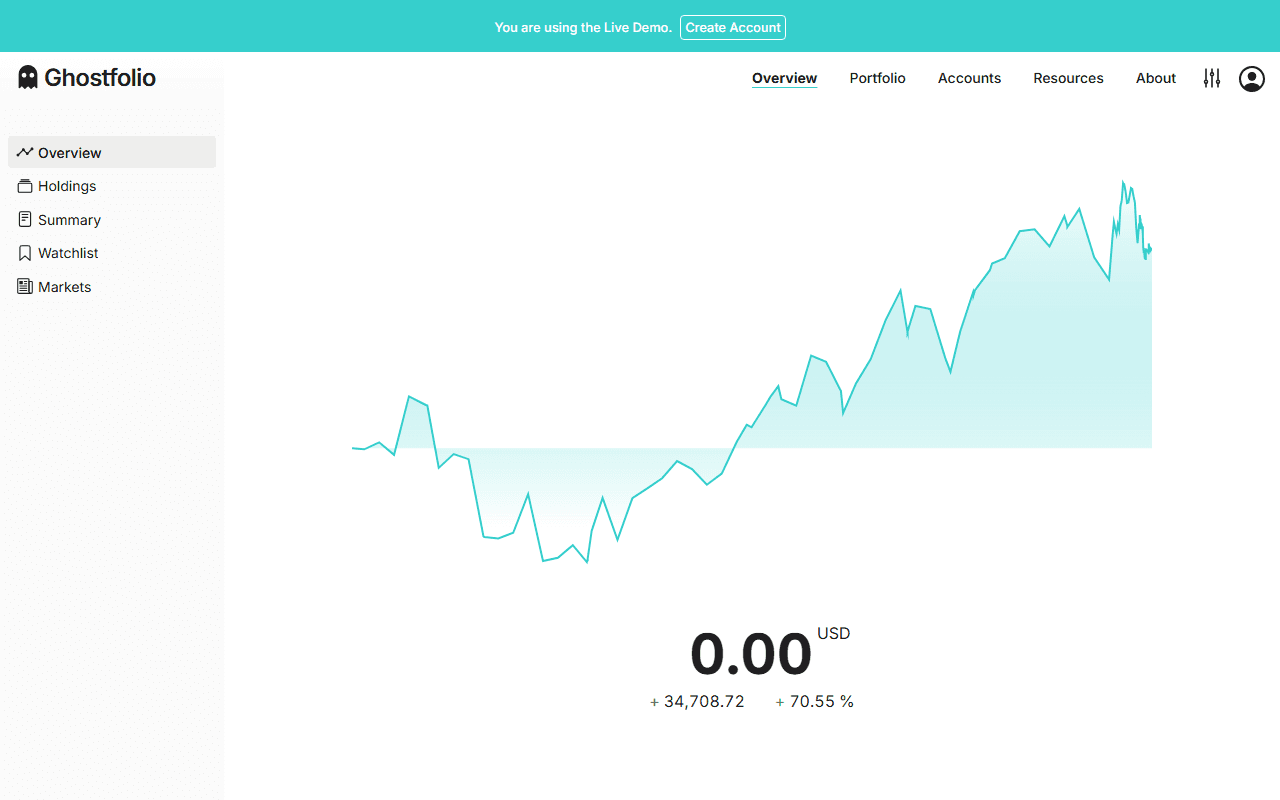 The official Ghostfolio live demo. Anyone can open it at ghostfol.io/en/demo
Two doors in. The easy one is the official hosted version at ghostfol.io, sign up and go. The sovereign one is self-hosting, and the README keeps it short:
cp .env.example .env    # create the env file and fill it in
docker compose -f docker/docker-compose.yml up -d
# Open http://localhost:3333 and create the first user via "Get Started"
The payoff scenario is rebalancing. Spread across accounts, a lopsided allocation is invisible; on one screen, "I am way overweight tech" jumps out immediately. Opening it once a quarter just to eyeball the allocation pie earns its keep. Two catches: the hosted version has a paid Premium tier, so fully free means self-hosting, and transactions come in manually or via CSV, so do not expect every brokerage to sync itself.
3. yfinance: stock data in five lines of Python
 The yfinance repo. github.com/ranaroussi/yfinance
Fastest way to explain this one is to just show the code. With Python installed, it is pip install yfinance in a terminal, then, going by the official docs, these five lines:
import yfinance as yf

aapl = yf.Ticker("AAPL")             # Apple
msft = yf.Ticker("MSFT")             # Microsoft

print(aapl.history(period="10y"))    # 10 years of prices, as a table
print(msft.dividends)                # full dividend history
That drops Yahoo Finance's prices, currencies, and indexes into a table. It is a library, a bundle of ready-made functions, so those five lines really are your whole program. Before paying for market data, this covers most study and verification needs, and the dividend history alone is quietly useful: you can count for yourself how many years a company has actually raised its payout.
It also plugs straight into the AI workflow this blog keeps returning to: save the output as CSV, upload it to ChatGPT or Claude, and analyze it exactly like a bank statement export. One line to draw, though. This is not affiliated with Yahoo, and the repo itself says research and educational use. When Yahoo changes something upstream it can break for a while, so it is a study tool, not a pillar of a live trading system.
4. OpenBB: honestly overkill for beginners, and that is fine
 The OpenBB repo. github.com/OpenBB-finance/OpenBB
Most stars of the four (70.5k), and in my judgment the last one you should install. This is less a personal finance app and more an analyst-grade research platform, an open-source run at what Bloomberg-style paid terminals do: fundamentals, news flow, and macro data behind one interface. Where yfinance fetches one series, OpenBB wires up many data providers at once.
The entry point is still light. The README's own first example:
pip install openbb
from openbb import obb
output = obb.equity.price.historical("AAPL")   # Apple price history
df = output.to_dataframe()                     # as a table
Two catches. The platform is free, but some connected data providers require API keys (an access credential for a service) and some of those are paid. And the docs are vast enough that the first session can feel like standing in a library with no map. Start with yfinance; graduate here when it feels cramped. If research is your routine, nothing free comes close. If it is not, skip it guilt-free.
The cut list, published on purpose
Half of a curation is what you leave out. Here is what I reviewed and cut, with reasons.
- Firefly III · Ghostfolio
- yfinance · OpenBB
- All updated within 12 months
- Maybe: archived Jul 2025
- backtrader: no recent commit confirmed
- PublicDataReader: last release Mar 2025
Maybe is the cautionary tale. A hugely popular budgeting app, 54.3k stars, archived read-only on July 27, 2025. Pick by star count alone and you would be parking your budget in unmaintained software right now. backtrader (22.4k stars), the famous backtesting library, would not show me a verifiable recent commit, so it fails the 12-month rule. PublicDataReader, a solid Korean public-data library, last shipped in March 2025, so it sits out this round.
FAQ
Are open-source finance tools actually free?
The software is. The fine print: self-hosted tools like Firefly III and Ghostfolio need a server, which can cost a few dollars a month in the cloud; Ghostfolio's official hosted version has a paid Premium tier; and OpenBB is free but some of the data providers it connects to require paid API keys. Think "free code, infrastructure and data sold separately."
Do I need to know how to code?
Depends on the tool. Firefly III and Ghostfolio work like normal web apps once installed; the install itself uses Docker and is a few copy-paste commands from the docs. yfinance and OpenBB assume basic Python (install a package, run a few lines). If you want zero code, Ghostfolio's hosted cloud version is the easiest door in.
How do I tell if a GitHub repo is alive or abandoned?
Check three things on the repo page: stars (a rough popularity signal), the latest commit or release date (updated within the last 12 months?), and whether it is archived (frozen read-only). Maybe, a budgeting app with over 50k stars, was archived in July 2025 and is no longer maintained. Stars alone will walk you straight into that trap.
Can these tools connect to my bank automatically?
Keep expectations modest. Bank sync in the open-source world is patchier than in Mint-style commercial apps, and coverage varies by country and institution. The reliable fallback everywhere is CSV import: download transactions from your bank or card issuer and pull them in. Firefly III ships an official companion (Data Importer) exactly for that.
My honest take
My entry order, if you want one: no coding, start with Ghostfolio's hosted version and get your net worth on one screen. Care about owning your data, self-host Firefly III. Comfortable with Python, pull data with yfinance and feed it to your AI workflow. Research as a habit, then OpenBB. Nobody needs all four. Pick the one bottleneck you actually have, spending, visibility, or data, and install exactly one thing.